
Congratulations, you’ve succeeded in getting your website ranking on Google! It’s quite an achievement and can take quite a bit of dedication and skill – not to mention time. But now what?
Well, now you actually want people to click on your link and visit your website, which was the whole purpose of working on your page ranking in the first place.
One very effective way you can do this is to make sure your title and description are as enticing as possible, showing that your site has the essential answer to the original search question.
However, another option is to include a much more visual slant to your entry. You’ve almost certainly already seen these – an article showing the author’s photo, a review site’s star ratings for a restaurant or a book review, and you may have wondered how they appeared, or more importantly thought that you’d quite like that for your website too.
This additional formatting, known as ‘rich snippets’ immediately draws your eye, especially when surrounded by results in plain text. It should also draw the mouse click onto your site. More importantly, these rich snippets should appear within the relevant results to a specific search query. This is achieved by using ‘schema’.
What are Rich Snippets and Schema?
We’ve discussed using rich snippets before as a way of visually promoting aspects of your website. But what sits behind them is schema - a structured data standard for providing microdata and generating those rich snippets. This structuring of data should help to help improve page rankings as it makes it easier for search engines to find the relevant sections of your site and deliver them as highly relevant search results in a much more visible format.
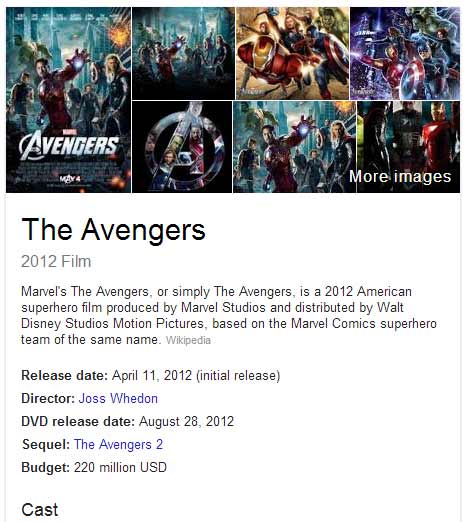 Put simply, schema is used to tag content on your website with html code in order to tell Google, Yahoo and Bing exactly what that content is. It’s like an index to a book, only much more interesting.
Schema tags are not just limited to books or authorship or restaurants. There are literally hundreds of tags available, from identifying small businesses, to movies (the image on the left is Schema generated), to people and events, which are all listed on the Schema website.
Right. Why?
Here’s where we start getting technical…
So that search engines know what that information means, and as such can deliver the most relevant results to us on search engine results pages (SERPs).
You see, when humans view a web page we can quickly and easily understand what it's about and how useful it is to us. Search engines attempt to do this on our behalf by crawling the information on millions of web pages and delivering the results to us when we search - however, determining what is useful and relevant is considerably more difficult for search engine robots.
This means search results can be hit and miss, with SERPs not delivering the information we're actually searching for. Those short snippets delivered to our screens don't necessarily sum up what your pages are about or grab our attention. Icebergs melt and polar bears drown - oh they can swim, but for how long, how long dammit?! Think of the polar bears, THE POLAR BEARS!!!
However, when data is structured in a way that tells search engines what it's all about it's much easier for them to understand it, know what to do with it, and deliver it to the right people when they perform an online search. We as website owners can assist search engines by structuring their content, and ultimately help users searching for our products or services to find what they're looking for.
How do I add Schema to me website?
Historically we had to code this Schema into the website, but nowadays most of the CMS systems will have a plugin or SEO tool which makes adding Schema onto your website much easier. For example Rank Math or Yoast plugin for WordPress are both set up to help you add Schema Markup easily to your website. They are good at guiding you through the process, but it is also worth spending some time looking through the schema.org site to understand what each type of schema you should be using for your type of business.
Testing your Schema Markup
Google provides a free structured data testing tool. This will give you an indication of what information will appear in the rich snippets, and if it's valid.
Tracking your rich snippets
This can be done in several ways. Google search console will show you in your account, navigate to Performance - Search Appearance to view. The information is a bit limited though in comparison to tracking given by some of the popular SEO software tools.
Will this help my Google page rankings?
Rich snippets may not help your rankings directly, but they are sending all the right signals to your users and Google. They are much more eyecatching in the SERPs, giving better click through rates and sending positive feedback to Google about the quality of your content.
The Channel Web Development team has extensive experience of adding schemas to our clients' websites and our Digital Marketing team can advise you on where using schema terms would be most beneficial to your website.


