
Each time you visit a website your online information passes through a number of different computers across the world before it reaches its destination. This is the way the internet works.
However, connecting devices together to communicate with one another does mean any of these computers could potentially read sensitive information you send to the websites you visit - such as credit card details, usernames and passwords.
With so many security and privacy concerns on the web, wouldn't it be great if there was something that would prevent this information being snooped on, and reassure your clients and customers that their visit to your site is private and secure?
This is where SSL (Secure Sockets Layer) comes in. SSL protects the information you send across the internet, but only if the website you're sending information to uses an SSL certificate. When an SSL certificate is used, the information is "encrypted", making it unreadable to everyone except your device and the website you are sending your information to.
Having an SSL certificate on your website provides additional security, privacy, and maintains the integrity of transmitted information. It even gives your website a boost on Google!
You're seeing SSL in action right now
When an SSL certificate is installed on a website you will notice a difference in the "URLs" (the full addresses of the web pages). Where it begins "http://www...", this will be "https://www..." on a website with a certificate:

Depending on which web browser you use, you'll see we're using SSL by checking the address bar as in the image above (you may have to select the address bar to show the full address).
You may also see a padlock icon:

Or select the site information icon to confirm you have a secure connection with our site:
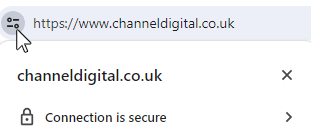
This change from using "HTTP" to using "HTTPS" signifies that connections between your visitors and your website are secure.
Why is this important?
As well as the protections using SSL provides, an announcement from Google back in 2016 indicated a long term plan to highlight HTTP pages as being "non-secure" in their Chrome browser, with other web browsers following suit.
This initiative means HTTP pages are shown as “Not secure”, whereas HTTPS pages are all shown as "Secure". Again, depending on the web browser you use, this may appear in the address bar as follows:
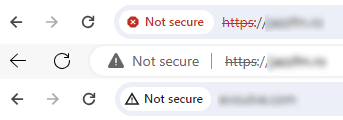
When that page contains password and credit-card input fields, you're not likely to trust it - and nor should you!
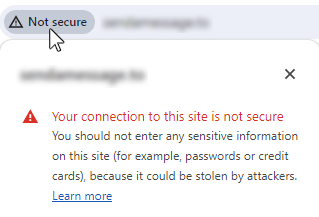
Given that Google already favours websites with an SSL certificate in search engine page results, this is a clear sign that you should join the majority of our clients by making the switch to HTTPS and reap the benefits of a more secure and trustworthy site with better search engine rankings.
So, how do I get an SSL certificate?
For most websites you can use a free Let's Encrypt certificate. A good web host will provide Let's Encrypt certificates at no additional charge (we do), and in most cases it will either be on by default or just requires you to flick a switch in your hosting account to turn it on.
However, there are different types of certificate to choose from depending on the level of security you need. Most websites only need basic SSL, but certain other websites in varying industries have more stringent requirements.
We can help guide you to the most appropriate option.
Ok, then what?
If your host does not provide a simple user interface for you to install your certifcate, you can attempt to install it directly on the server yourself if you know what you're doing, or spend some time with your hosting company's support documents or helpline going through the installation process.
Or you can let our team handle this for you, making the initial set up quicker and much more straightforward - especially when you're already our client.
Great, then I'm all secure?
Not quite. After the certificate has been installed on your web server, you have to configure your website's settings to use the certificate.
This is vital, as an incorrectly configured certificate or website can produce warnings to your website visitors that your site is not secure - even if it actually is! You may even see a "not secure" warning due to badly implemented or expired certificates before even being shown the web page:
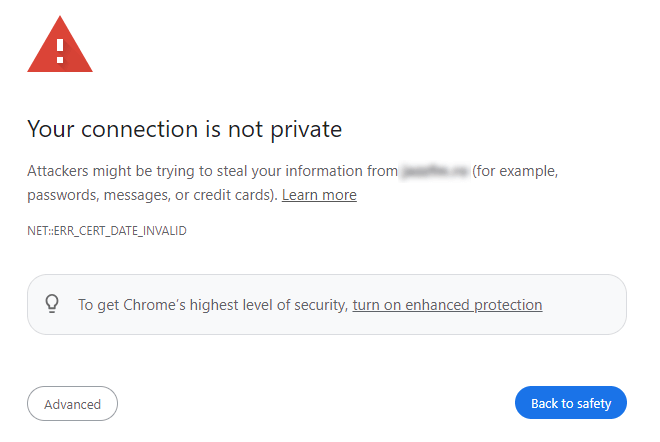
There are lots of gotchas to look out for, such as linking to a photo or video from another site which, if not done correctly, will produce a warning.
On top of that, the change from "http" to "https" in your URLs, if not handled correctly, can negatively affect your search engine rankings. You may also need to update to add a new "https" version of your site to your Google Search Console.
Channel can take care of all of this by properly configuring your site, making sure your search engine rankings are maintained - in fact, your rankings may even improve.
(Don't forget - properly securing your website also takes going through an additional security hardening process and keeping your website regularly up to date. This is a service we also offer.)
Do I really need an SSL certificate?
Yes! Why:
- Lets your website visitors know that their information, transactions and interactions on your website are kept between you and them.
- Essential for PCI compliance (if required on your website)
- Helps improve your search engine rankings.
- Adds an extra layer of security to your whole website.
- No 'not secure' warnings shown on your web pages.
Sounds good, what do I do next?
If you're already hosting your website with us you already have SSL installed on your server and configured on your website as standard.
Not hosting with us? Not a problem, we can still handle your SSL certicate installation as long as we have your up to date hosting account details.
And, because we want to keep you and your customers safe we're offering our additional security hardening service, worth over £100, at a discounted rate with our SSL certificate installation service.


