
A very powerful free tool for your business is your Google Business Profile listing. Being right at the heart of Google itself, it is an essential ranking signal for local SEO and when you gain some of those magical 5* reviews, it will help attract new clients to your business.
What is a Google Business Profile?
A free resource that allows you to manage your online presence throughout Google Local results in a comprehensive manner. This presence includes your business details within search and on Google Maps. You can add a myriad of details to your listing including opening hours, images and videos and contact details. You can interact with your customers by responding to their reviews, you can add content to share, information about your products and use your listing to launch adverts.
How do I get started?
If you do not already have a listing, your first step is to create one here.
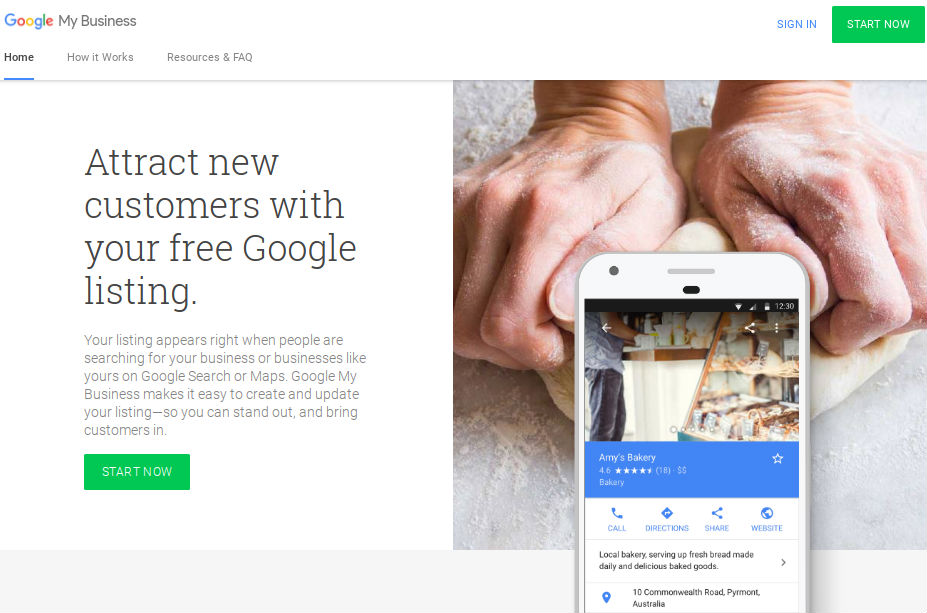
How to optimise your listing
Google have some comprehensive guidelines which will help you with the set up and verification of your listing.
Be thorough with all your details, this will be rewarded in the Google rankings algorithms. There are some comprehensive guidelines which will help you with the set up and verification of your listing.
In addition to the standard information, you can share details about your events, services and the latest information from your business. These can be very powerful for your listing, more details about how to make the most of it can be found here.
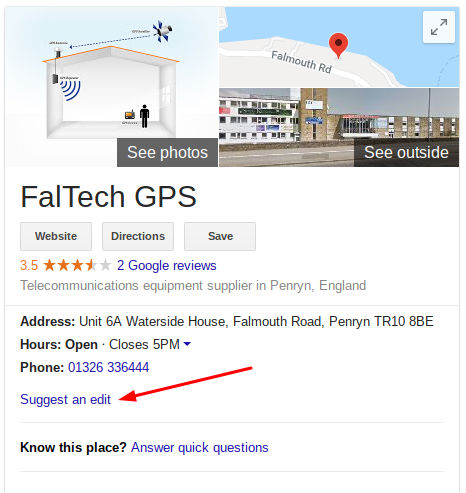
Be aware, anyone else can add details to your listing. As you can see from the image shown Google encourages users to suggest edits to your listing. If someone adds an edit, as the verified owner of the listing, you should get an alert. Make sure you are set up to recieve these alerts either by email or using the Google Business Profile app on your phone.
Consistency of Citations and NAP
One of the algorithms used by Google is how consistent your NAP (name, addresss and phone number) is online. Having even the smallest differences can have a negative impact on your rankings. As you build up your citations online, ensure they are 100% consistent. If you are unsure about what is already listed online, I recommend using Bright Local, whose 14 day free trial is a good place to start.
Google Business Profile Reviews
Once you have filled out your listing with all the details you can, the top priority is to get some reviews. These will be clearly seen on your listing and can have a powerful effect on both your rankings and click through rates. We have seen some dramatic increases in click through rates in our client accounts with only a few 5 star reviews added onto their listing. This is backed up by the Bright Local Consumer Review which found that:
- 97% of consumers looked online for local businesses in 2017, with 12% looking for a local business online every day
- 85% of consumers trust online reviews as much as personal recommendations
- Positive reviews make 73% of consumers trust a local business more
How to get those valuable 5* reviews:
Google Business Profile encourage you to ask for reviews from your customers, but ensure you follow their guidelines. If you step outside of these of guidelines your reviews may be removed.
Many people, when asked, will happily leave you a review. To make this easy for them to do, we suggest sending an email with a link that takes them straight to your business listing review area. To do this you will need to generate a link for your listing:
- Visit Google Places API.
- Add your business information in the ‘Enter a location’ field above the map.
- Click on your name:
- Your Place ID will appear below your business name:
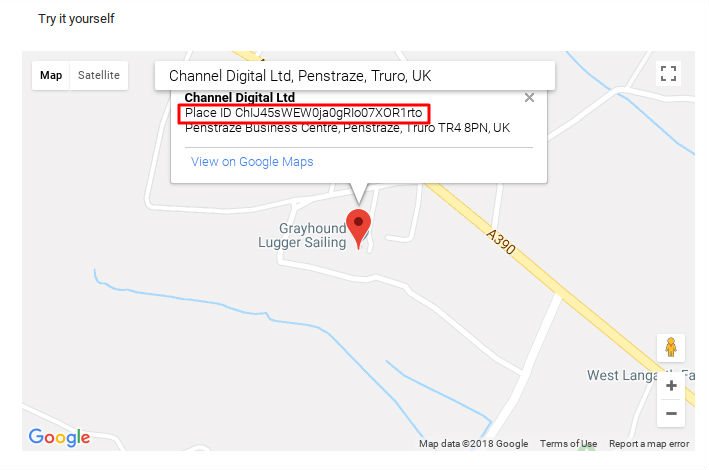
- Copy your place ID onto the end of this URL: https://search.google.com/local/writereview?placeid=
- Our link looks like this: https://search.google.com/local/writereview?placeid=ChIJ45sWEW0ja0gRIo07XOR1rto. When you click on this link it will take you straight to the location to write a review.
- This is quite a long URL so you can shorten it using a URL shortener such as Bitly or Short URL shortener.
- Share this link with your clients and ask for a review.
What about bad reviews?
This is a very regular question but it is not something you should fear. One or two bad reviews will not affect your business. In fact we had one client who came to us a number of years ago about a bad review on a prominent forum about their business. We addressed the issue in a very upfront and honest way, explained the situation clearly and engaged with the complaint. As a result of this our client has received a number of business enquiries from this particular online presence. If you keep providing a good service and wow your clients, those rare bad reviews will be far outweighed by the positive reviews.
Get alerts when someone writes a review
It is important to manage your reputation by enabling alerts for every new review. Responding quickly and professionally, to both positive and negative reviews, demonstrates to potential clients that you are active and attentive.
How to manage your notifications:
- Desktop: You can update your email notification settings by visiting your Google Business Profile dashboard.
- Mobile: Instead of a standalone business app, Google now sends alerts directly through the Google Maps app.
Download the app for real-time alerts:
To get instant push notifications on your phone when a new review lands, make sure you have the Google Maps app installed and notifications turned on:
- For Android: Download via the Google Play Store.
- For iPhone: Download via the App Store.
By having the app ready, you can respond to feedback in a timely manner and stay informed about any profile updates or new features Google releases to help your business grow.
Local SEO and further help
There is a myriad of other techniques that you can use to help rank for local search on your website. If you would llike further help with this area please contact us for a chat. We would love to help.


